When you plan WhatsApp automation or bulk messaging, your first practical question is simple: “How long will this actually take to go live?” You do not want vague promises; you want realistic timelines you can plan around.
WhatsApp API setup can be fast when you prepare properly, or painfully slow if you miss critical details. By understanding each stage and the dependencies, you can predict your go‑live date and avoid unnecessary back‑and‑forth.
WhatsApp API Setup Timelines
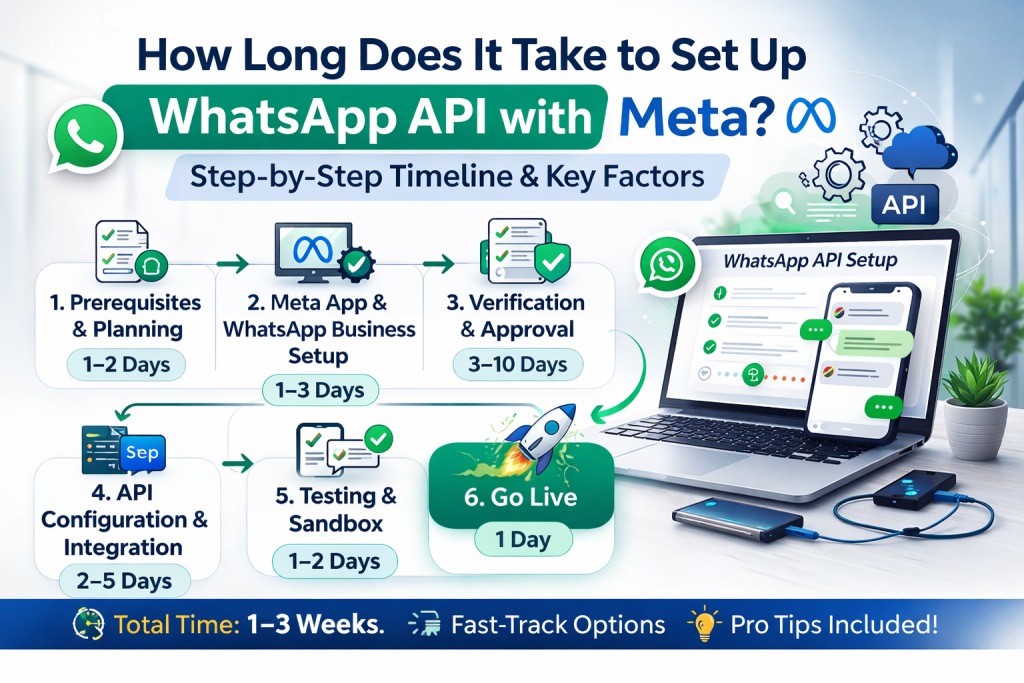
If everything is ready on your side, you can get a basic WhatsApp API setup running in a few hours and fully usable within 1–3 working days. In more complex cases, multiple brands, strict compliance checks, or incomplete documents, it can stretch to a week or more.
In practice, your total time depends on three main factors: how fast your business verification is approved, how cleanly your phone number is prepared, and how quickly you integrate or connect to the chosen platform. When you control these, your timeline becomes predictable instead of guesswork.

Stage 1: Business Verification Timeframe
Business verification sits at the core of your setup timeline. Without it, your account is limited and sometimes blocked from scaling.
Typically, you should expect:
- If your documents and website are clear and consistent, verification can be approved within 24–72 hours.
- If there are mismatches in legal name, address, or website, you may face rejections and resubmissions that add several more days.
Stage 2: Phone Number Preparation and Approval
The phone number step is often underestimated, but can delay you if handled casually. The actual verification via SMS or call usually takes minutes, but only if the number is ready.
There are a few rules you must follow:
- The number cannot be in active use on the regular WhatsApp or WhatsApp Business app.
- It must be able to receive an OTP reliably via SMS or voice.
- You should decide early if it will be a mobile, landline, or toll‑free number.
- If you forget to deregister the number from the app, you end up repeating the process and burning another day. When you prepare this in advance, the number stage is almost instant.
Stage 3: Connecting to WhatsApp API (Cloud or Provider)
Once your business and number are ready, the technical connection is usually the fastest part if you know what you are doing. Using the Cloud API or a provider’s dashboard, basic connection can be done in under an hour.
Your timeline here depends on your approach:
- If you already have a platform that supports WhatsApp API, you mainly plug in tokens and webhooks.
- If you are building from scratch, you must allocate time for authentication, endpoints, and testing.
For most businesses that use an existing platform, “connection” is a same‑day task, not a multi‑day project.
Don’t worry! Message Box takes care of everything!
Stage 4: Template Creation and Approval Delays
You can technically go live with session messages as soon as your connection works, but for outbound or bulk messaging you need templates. This is where timelines can stretch if you are not careful.
In many cases, template approval takes a few minutes to a few hours. However, poorly written or non‑compliant templates can be rejected, forcing edits and resubmissions that easily add extra days. You minimise delays by:
- Writing templates that are clear, non‑spammy, and aligned to allowed use cases.
- Avoid overly aggressive promotions in your very first submissions.
If your templates are prepared and checked in advance, you can have the first ones approved the same day your API connects.
Stage 5: Integration and Workflow Configuration
Even after the API technically works, you still need to wire it into your workflows so that your team can actually use it. This stage is where your internal complexity matters more than WhatsApp’s.
For a simple setup, basic inbox, some automation, and notifications, this can be done within 1–2 days. For more advanced setups involving CRMs, ticketing systems, and multi‑step automations, you should budget several days to a couple of weeks, depending on your internal resources.
The key is to separate “minimum viable go‑live” from “full ideal setup”. You can go live with essential flows quickly and keep adding sophistication over time.
Fast Track vs Slow Track: What Speeds You Up
You can influence your setup speed more than you might think. Fast setups usually have these in place:
- Clean, consistent business documents and website.
- A dedicated number is ready and disconnected from regular WhatsApp.
- Pre‑planned templates and use cases, not written at the last minute.
- A clear decision on which platform or approach you are using for the API.
Slow setups, on the other hand, get stuck on back‑and‑forth with verification, missing information, or internal indecision about tools and workflows. If you address those before starting, you almost always beat typical competitor timelines.
Realistic End‑to‑End Timeline Scenarios
To make this practical, think in terms of scenarios:
- Best‑case: Business is already verified, the number is clean, platform is chosen. You can connect, verify, and send first API messages within a few hours, with templates approved within the same or next working day.
- Normal case: Business verification pending, a new number to set up, and a few templates to draft. You can expect 2–5 working days to be fully live with both inbound and outbound.
- Complex case: Multiple brands, unclear documentation, strict internal approvals, or custom integrations. You might be looking at 1–3 weeks to reach a stable, scalable configuration.
Knowing which scenario you are in helps you set expectations within your team and with stakeholders.
FAQs
1. How long does it take to set up the WhatsApp API for a new business?
If your documents and website are ready, you can usually set up WhatsApp API in 2–5 working days, including verification, number connection, and first template approvals. The actual technical connection can be done much faster once your business is approved.
2. Why is my WhatsApp API setup taking longer than expected?
Delays usually come from business verification issues, inconsistent business details, or rejected templates. In some cases, internal delays such as choosing a number or finalising use cases add more time than the WhatsApp side itself.
3. Can I start using WhatsApp API the same day I apply?
In some cases, yes. If your business is already verified and you have a clean number ready, you can connect the API and start session‑based conversations the same day. Templates for outbound campaigns may still take a bit more time to get approved.
Setting up the WhatsApp API is not an endless process; it is a series of clear steps that you can move through in days when you prepare properly. The difference between a smooth one-week rollout and a frustrating multi-week delay usually comes down to documentation, readiness, and template quality.
When you treat each stage deliberately and aim for a minimum viable go‑live, you can start generating value from WhatsApp quickly and then keep refining your setup over time.